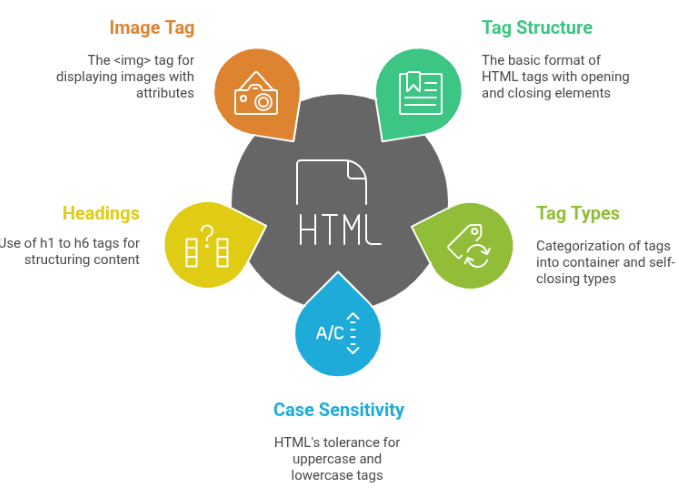
HTML Tags
- This lesson explains HTML tags and elements, including opening and closing tags, with simple examples to help beginners understand HTML easily.
HTML Works Using Tags
HTML does everything using tags.
A tag tells the browser:
What type of content it is
How it should be displayed
👉 Without tags, a browser cannot understand anything.
Tag Structure
Every normal HTML tag has this structure
<tagname> Content </tagname>
Basic HTML Paragraph
This code displays a simple paragraph with the text "This is a paragraph" using the p tag.
<p> This is a paragraph </p>Opening tag → <p>
Content → This is a paragraph
Closing tag → </p>Types of HTML Tags
HTML tags are mainly of two types:
Container Tags
(Have Opening + Closing Tag)
These tags wrap content inside them
Basic HTML Structure
This code shows a heading, a paragraph, and a div container to display simple content on a webpage.
<h1> Title </h1>
<p> This is a paragraph </p>
<div> This is a container </div>
Structure:
Opening tag
Content
Closing tag
Self-Closing Tags
(No Closing Tag)
These tags do not contain content
They close themselves automaticallyExamples:
<img />
<br />
<hr />
Used for:
Images
Line breaks
Horizontal lines
HTML is NOT Case-Sensitive (But Be Careful)
Both of these work:
<P>Hello</P>
<p>Hello</p>
But best practice
👉 Always use lowercase tagsClean
Professional
Industry standardHTML Tags
(Building Blocks of a Webpage)
HTML works completely using tags.
Each tag tells the browser:
What type of content it is
How it should behave
How it should appear structurally
Combine them to build a full webpage
What Are HTML Headings ?
HTML headings are used to define:
Main titles
Section headings
Sub-headingsThey help:
Users understand content
Search engines read page importance
Create proper structure
Heading Levels
Heading Levels describe the hierarchy of content in an HTML page.Using proper heading levels helps organize content clearly and improves readability and SEO.
<h1>Main Heading</h1>
<h2>Sub Heading</h2>
<h3>Smaller Heading</h3>
<h4>Section Title</h4>
<h5>Minor Heading</h5>
<h6>Least Important Heading</h6>
Rules to remember:
<h1> → Most important (page title)
<h6> → Least important
What is the <img> Tag ?
The <img> tag is used to display images on a webpage.
Images can be:
Photos
Logos
Icons
Banners
Graphics
The <img> tag is a self-closing tag
It does NOT have a closing tag.Basic Syntax of <img> Tag
<img src="image.jpg" alt="Image description">
Important Attributes of <img>
src (Source)
Tells the browser where the image is located
Basic Image Tag
This code displays an image on the webpage using the image tag with a source file named photo.png.
<img src="photo.png">alt (Alternate Text)
Text shown when:
Image fails to load
Screen readers are used (important for accessibility)
Improves SEO
HTML Image Tag Example
This code displays an image using the img tag with a source file and alternate text for accessibility.
<img src="car.jpg" alt="Red sports car">Always use alt attribute
width and height
Used to control image size
Image Display Using HTML
This code displays an image (logo.png) with a fixed width of 200px and height of 100px.
<img src="logo.png" width="200" height="100">Units are in pixels by default
Common Mistakes to Avoid
Forgetting alt attribute
Wrong image path
Using image for text (bad for SEO)Quick Tip
Do NOT use headings for styling
Use headings for meaning & structureStyling comes later with CSS