HTML Tables
-
This lesson explains how to create and use tables in HTML, including rows, columns, headers, and basic table structure.
Tables help us display structured, relational, row–column data beautifully.
Think of them as Excel sheets inside HTML.Why HTML Tables Matter
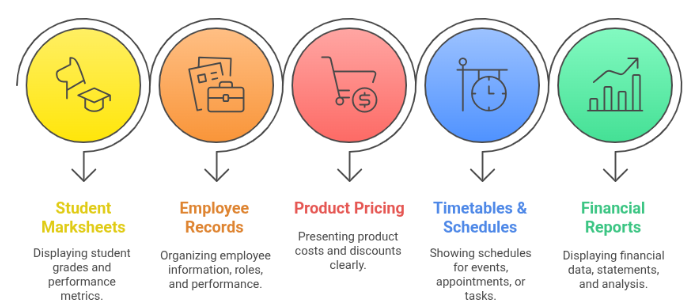
Tables are perfect for displaying data such as:
Student marksheets
Employee records
Product pricing tables
Timetables & schedules
Financial reportsImportant:
👉 Tables are meant for data display, NOT webpage layout (very common interview question)
What Is an HTML Table ?
A table consists of:
Element Meaning <tr> A row <th> Header cell (bold, important) <td> Data cell Think of this like an Excel sheet:
Rows (horizontal)
Columns (vertical)Each cell stores related information.
<table border="1">
    <tr>
        <th>Name</th>
        <th>Age</th>
    </tr>
    <tr>
        <td>Ana</td>
        <td>22</td>
    </tr>
    <tr>
        <td>John</td>
        <td>25</td>
    </tr>
</table>
Understanding Table Components
<table> — The Table Container
Wraps the entire table
Without <table>, rows & cells won't work
border="1" is only for learning
In real projects → use CSS<tr> — Table Row
Creates one horizontal row.
A table contains multiple <tr> elements.<th> — Table Header Cell
<th>Name</th>
Bold
Centered
Helps SEO
Helps screen readersUsed for:
Column headings
Row headings
<td> — Table Data Cell
<td>Ana</td>
Stores actual data
Used inside rowsTable Caption (Table Title)
<table border="1">
    <caption>Student Data</caption>
    <tr>
        <th>Name</th>
        <th>Age</th>
    </tr>
</table>
Why <caption> Matters:
Describes what table is about
Improves accessibility
Appears above the tableSemantic Table Sections
Used for clean structure, SEO, and accessibility.
Tag Purpose <thead> Table header section <tbody> Main content (data) <tfoot> Summary/footer
<table border="1">
    <caption>Student Scores</caption>
    <thead>
        <tr>
            <th>Name</th>
            <th>Score</th>
        </tr>
    </thead>
    <tbody>
        <tr>
            <td>Ana</td>
            <td>85</td>
        </tr>
        <tr>
            <td>John</td>
            <td>90</td>
        </tr>
    </tbody>
    <tfoot>
        <tr>
            <td>Total</td>
            <td>175</td>
        </tr>
    </tfoot>
</table>
Benefits:
More organized
Better for screen readers
Easier to style with CSSMerging Cells (colspan & rowspan)
Sometimes, we need one cell to cover multiple columns or rows.
colspan — Merge Columns
<td colspan="2">Full Name</td>
Spans across two columns
Useful for headings
<tr>
    <td colspan="2"> Student Information </td>
</tr>
rowspan — Merge Rows
<td rowspan="3">Maths</td>
Spans across three rows
<tr>
    <td rowspan="2">Math</td>
    <td>Ana</td>
</tr>
<tr>
    <td>John</td>
</tr>
Rules for Merging Cells
Total number of columns must remain consistent
Extra <td> tags break layout
Most common beginner mistake!
Styling Tables (HTML vs CSS)
Old Way (Not Recommended)
<table border="1">
Modern CSS Way (Recommended)
<style>
table {
border-collapse: collapse;
}
td, th {
border: 1px solid black;
padding: 8px;
}
</style>
Cleaner
More control
ProfessionalCommon Mistakes to Avoid
Using tables for webpage layout
Missing <th> tags
No <caption>
Wrong colspan/rowspan
Using HTML attributes instead of CSSWhen NOT to Use Tables
Avoid using tables for
Page layout
Navigation
FormsUse instead:
<div>
Flexbox
CSS Grid
<table>
  <caption>Smartphone Comparison</caption>
  <tr>
      <th>Feature</th>
      <th>iPhone</th>
      <th>Samsung</th>
  </tr>
  <tr>
      <td>Camera</td>
      <td>12 MP</td>
      <td>108 MP</td>
  </tr>
  <tr>
      <td>Battery</td>
      <td>3000 mAh</td>
      <td>4500 mAh</td>
  </tr>
</table>
HTML tables:
Display structured data
Provide semantic sections
Improve accessibility
Support colspan & rowspan
Must be styled with CSS
Should NOT be used for layoutTables make it easy to represent complex, relational data in a clear and accessible way.