HTML Media
-
This lesson explains how to add and use media elements such as images, audio, and video in HTML webpages using simple examples.
HTML media elements transform a boring text webpage into an interactive, visual, engaging experience.
Why HTML Media Is Important
Websites use media everywhere:
Music / Podcasts (Spotify, Soundcloud)
Videos & Tutorials (YouTube, Udemy)
Maps & Tools (Google Maps embeds)
External embeds (YouTube, Vimeo, ads)👉 Media increases engagement, clarity, and user experience.
Audio in HTML
Basic Audio Player
<audio controls>
    <source src="song.mp3" type="audio/mpeg">
</audio>
Browser loads audio → shows a music player.
User can:
Play
Pause
Adjust volume
Seek
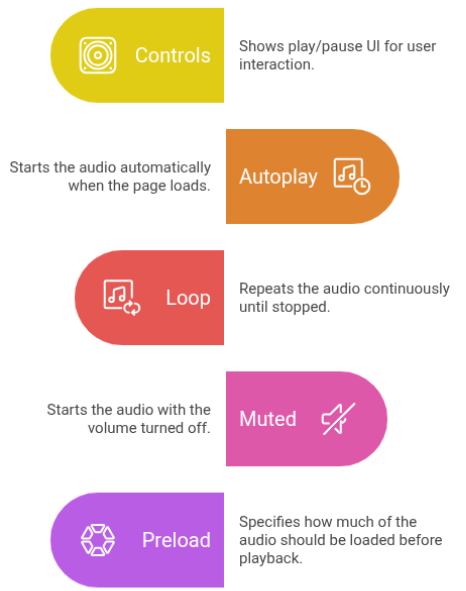
Audio Attributes
Attribute Purpose controls Shows play/pause UI autoplay Starts automatically loop Repeats the audio muted Starts muted preload How much audio to preload
Basic Audio Player
This audio element is used to play sound files on a web page.
<audio controls>
<source src="song.mp3" type="audio/mpeg">
</audio>Using the HTML Audio Tag
The HTML audio tag is used to add sound to a webpage and allows users to play audio files directly in the browser using built-in controls.
<audio controls loop muted>
	<source src="song.mp3">
</audio>
Autoplay usually needs muted (browser rules).
Multiple Audio Formats (Compatibility)
Multiple Audio Formats for Browser Compatibility
This example shows how to use multiple audio formats in HTML so the audio plays correctly across different browsers.
<audio controls>
	<source src="song.mp3" type="audio/mpeg">
	<source src="song.ogg" type="audio/ogg">
	Your browser does not support audio.
</audio>- ✔ Browser picks the first supported format
✔ Ensures compatibility across devices
Video in HTML
How Video Works
Browser loads video file
Displays built-in video player
User controls playback (play/pause/fullscreen)
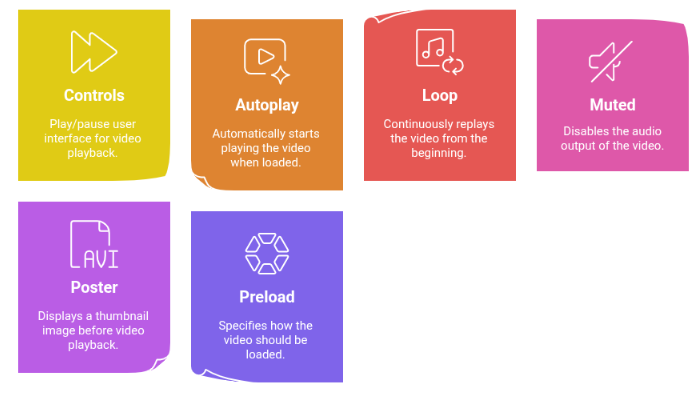
Common Video Attributes
Background Video (Used in Modern Websites)Attribute Meaning controls Play/pause UI autoplay Auto play loop Replay forever muted Required for autoplay poster Thumbnail image preload Load behavior
Basic Video Player
This video element is used to display and play video content on a web page.
<video width="400" controls>
    <source src="movie.mp4" type="video/mp4">
</video>
Background Video Section
This video plays automatically in a loop without sound, creating an engaging background effect for the webpage.
<video autoplay muted loop width="100%">
    <source src="bg.mp4" type="video/mp4">
</video>
Used on homepages
Great visual effect
Must be muted to autoplayMultiple Video Formats
Multiple Video Formats
This example shows how to use multiple video formats in the video tag to ensure better browser compatibility and smooth video playback.
<video controls>
    <source src="video.mp4" type="video/mp4">
    <source src="video.webm" type="video/webm">
</video>
Ensures browser compatibility.
Iframe (Embedding External Content)
What is an Iframe ?
An iframe embeds another website inside your page.
Common Uses
YouTube embeds
Google Maps
External dashboards
Ads & widgetsImportant Iframe Attributes
Secure Iframe ExampleAttribute Purpose src Page URL width/height Size allowfullscreen Fullscreen videos loading Lazy load sandbox Security restrictions
Using iframe in HTML
The iframe tag is used to embed another webpage inside the current page.
<iframe src="page.html" sandbox loading="lazy"> </iframe>Blocks malicious scripts
Safer embeddingAlways provide:
alt for images
captions/subtitles for videos
Avoid autoplay audio
Provide fallback textExample:
HTML Video Tag Example
This example shows how to embed a video in an HTML page.
<video controls>
    <source src="video.mp4">
    Your browser does not support video.
</video>
Common Mistakes
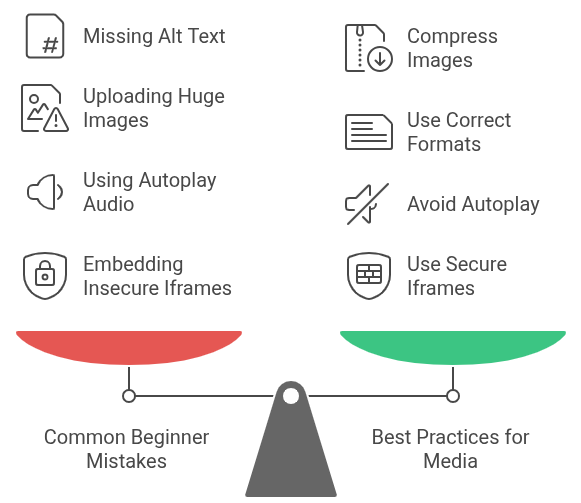
Missing alt text
Uploading huge images without compression
Using autoplay audio
Not muting autoplay videos
Embedding insecure iframesBest Practices for Media
Compress images
Use correct formats (WebP, MP4, OGG)
Use lazy loading
Add captions/subtitles
Use secure iframes
Avoid autoplay unless mutedMedia is essential for modern web design. Using images, audio, video, and iframes effectively leads to:
Better user engagement
Better accessibility
Better SEO
Faster loading when optimized correctly