HTML Lists
-
This lesson explains different types of HTML lists including ordered, unordered, and description lists with clear examples for beginners.
HTML lists are used to group related items together in a clean, readable, and meaningful way.
They help users, browsers, search engines, and screen readers clearly understand grouped information.Think of HTML lists like:
Bullet points in books
Numbered steps in recipes
Definitions in a dictionary
Why HTML Lists Matter
HTML lists are used everywhere on the web:
Navigation menus (Home, About, Contact)
Product features (Amazon, Flipkart)
Terms & conditions
Tutorial steps
Categories & subcategoriesLists improve:
Readability
Structure
Accessibility
SEO👉 Lists turn raw, boring text into organized and meaningful information.
What Is an HTML List ?
An HTML list is a collection of related items, created using special list tags.
HTML provides three main types of lists:List Type Tag Used Purpose Unordered List <ul> Bulleted items Ordered List <ol> Numbered items Description List <dl> Term + description
Unordered List (<ul>)
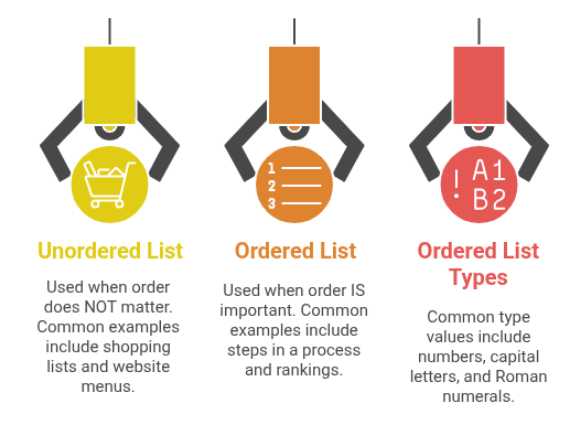
Used when order does NOT matter.
Common Examples:
Shopping list
Website menu
Feature list
Unordered List Example in HTML
This unordered list shows basic web technologies like HTML, CSS, and JavaScript using list items in HTML.
<ul>
    <li>HTML</li>
    <li>CSS</li>
    <li>JavaScript</li>
</ul>
Explanation:
<ul> → Unordered list container
<li> → List item
Browser shows bullets by default
Shopping List Using HTML
This example shows how to create a simple shopping list using an unordered HTML list to display items clearly and neatly.
<ul>
    <li>Milk</li>
    <li>Butter</li>
    <li>Bread</li>
</ul>- Used in:
✔ Grocery apps
✔ E-commerce filters
Ordered List (<ol>)
Used when order IS important.
Common Examples:
Steps in a process
Rankings
Instructions
Ordered List Example in HTML
This ordered list shows the basic steps to open a website by typing a URL in a browser and pressing Enter.
<ol>
    <li>Open browser</li>
    <li>Type URL</li>
    <li>Press Enter</li>
</ol>
Explanation:
Numbers appear automatically
Sequence matters
Ordered List Example – Cooking Steps
This ordered list shows step-by-step instructions for cooking oats, where each item follows a specific sequence.
<ol>
    <li>Boil Water</li>
    <li>Add Oats</li>
    <li>Cook for 10 minutes</li>
</ol>
Used in:
Tutorials
Form steps
User guidesOrdered List Types
Alphabetical Ordered List in HTML
his example shows how to create an ordered list using capital letters A, B, C in HTML.
<ol type="A">
    <li>HTML</li>
    <li>CSS</li>
</ol>
Common type values:
1 → Numbers (default)
A → Capital letters
a → Small letters
I → Roman numerals
i → Small Roman numerals
- Start Attribute (Ordered List)
Start Attribute in Ordered List
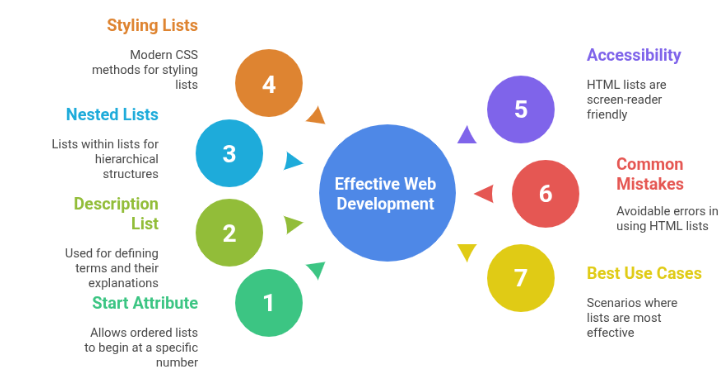
The start attribute is used to define the starting number of an ordered list instead of beginning from 1.
<ol start="5">
    <li>Item</li>
    <li>Item</li>
</ol>
Description List (<dl>)
Used for terms and their explanations.
Description List Example in HTML
This example demonstrates how HTML description lists are used to define terms and explain them clearly using dt and dd tags.
<dl>
    <dt>HTML</dt>
      <dd>Markup language for web structure</dd>
    <dt>CSS</dt>
      <dd>Used for styling webpages</dd>
</dl>
Explanation:
<dl> → Description list
<dt> → Term
<dd> → Description
Starts numbering from 5
Used in exams, pagination, question papersUsed in:
FAQs
DocumentationNested Lists (List Inside List)
Lists can be placed inside other lists.
Nested HTML List
This example demonstrates a nested HTML list showing frontend technologies.
<ul>
    <li>Frontend
        <ul>
            <li>HTML</li>
            <li>CSS</li>
        </ul>
    </li>
    <li>Backend</li>
</ul>- Used in:
Multi-level menus
Categories
Syllabus structure
Styling Lists (HTML vs CSS)
Old HTML Way
<ul type="square">
Modern CSS Way (Recommended)
ul {
list-style-type: square;
padding-left: 20px;
}
Better control
Cleaner code
Professional approachHTML Lists & Accessibility
HTML lists are screen-reader friendly by default.
Screen readers announce:
Number of items
Item position
<li> helps users understand grouping
Never replace lists with <div> for grouped content.
Common Mistakes
Forgetting <li>
Using <br> instead of lists
Using lists for layout
Over-nesting lists
Styling lists using inline HTML attributesWhen NOT to Use Lists
Avoid lists for:
Use lists when:
Page layout
Paragraph text
Random unrelated items
Items are related
Order or grouping mattersComparison of All List Types
List Type Best Use Case <ul> Features, menus <ol> Steps, ranking <dl> Definitions