Python Variables
-
A variable in Python is used to store data that can be reused and changed during program execution. Python variables do not require explicit data type declaration, making them easy and flexible to use. You can assign values such as numbers, text, or boolean values directly to variables using the assignment operator (=).
What Is variable ?
A variable is a name given to a value stored in memory.
Think of a variable as a container or box where you keep data, such as numbers, text, or any other information.When you assign a value to a variable, Python remembers it and you can reuse it anywhere in your program.
A variable always points to some data stored in memory.
Creating Variables in Python
In Python, you don’t have to declare a variable before using it.
A variable is created as soon as you assign a value to it.
Printing Variable Values in Python
This code assigns values to variables and prints them using the print() function.
name = "Radha"
age = 25
print(name)
print(age)
Here,
name is a string variable
age is a numeric variable
Python Variables Can Change Type
A variable can store any type of value, and you can later change it to another type.
Dynamic Typing in Python
This code shows that Python allows a variable to change its data type during execution without any error.
value = 10        # value is an integer
value = "Ten"     # now value is a string
print(value)
Casting (Converting Data Types Manually)
If you want to force a specific data type, use casting.
Type Casting in Python
This code converts values between string, integer, and float data types using built-in type casting functions.
a = int("10")      # a becomes 10
b = float("4.5")   # b becomes 4.5
c = str(100) # c becomes "100"Casting is helpful when input or data comes as a string.
Checking the Type of a Variable
Use the built-in type() function to check what type of data a variable contains.
Checking Data Types in Python
This code uses the type() function to display the data type of integer, float, and string variables.
item = 45
price = 89.99
text = "Hello"

print(type(item))
print(type(price))
print(type(text))
Using Single or Double Quotes for Strings
String variables can be written with single quotes (' ') or double quotes (" ").
Both are the same in Python.
String Variable Declaration in Python
This code shows how to assign string values to variables using both double and single quotes. Both are valid string variables.
city = "Mumbai"
state = 'Gujarat'
Variables Are Case-Sensitive
age and Age are different variables because Python is case-sensitive.
Case Sensitivity in Python Variables
This example shows that Python treats variables with different letter cases as separate identifiers.
score = 50
Score = 100

print(score)   # 50
print(Score)   # 100
Rules for Naming Variables in Python
Here are the strong rules every beginner must follow:
1. A variable name must start with:
A letter (a–z or A–Z)
Or an underscore (_)
❌ Invalid
1name = "John"
✔ Valid
name1 = "John"
_name = "Python"
2. Variable names cannot start with a number
age1 = 20 # ✔ valid
1age = 20 # ❌ invalid
3. Only letters, numbers, and underscores allowed
No spaces or special characters.
user_name = "Maya" # ✔ valid
user-name = "Maya" # ❌ invalid
user name = "Maya" # ❌ invalid
4. No keywords (reserved words)
You cannot use Python keywords as variable names:
Examples of keywords:
class, while, for, return, break, if, etc.
Example
class = 10 # ❌ invalid
5. Variable names are case-sensitive
total ≠ Total ≠ TOTAL
6. Use meaningful names (best practice)
Good names improve readability.
Good
student_name = "Rita"
total_price = 250
Bad
x = "Rita"
tp = 250
Storing simple details
student = "Meera"
marks = 88
subject = "Maths"
print(student, marks, subject)
Reassigning variable values
status = "Active"
status = "Inactive"    # changed value
print(status)
Combine multiple variables
first = "Java"
last = "Script"
fullname = first + " " + last
print(fullname)
Using variables in calculations
length = 6
width = 3
area = length * width
print("Area =", area)
Casting and checking type
num = "25"
num = int(num)

print(num)
print(type(num))
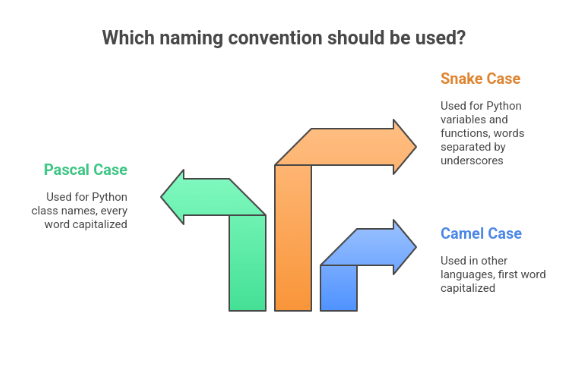
Multi-Word Variable Names :
When a variable name contains more than one word, it can become hard to read if written all together.
Python programmers use special naming styles to make multi-word variable names clear and easy to understand.1. Camel Case
In camelCase style, the first word is lowercase, and the next words start with uppercase letters.
No spaces and no underscores.
Camel Case Variable Naming in Python
This code demonstrates the use of camelCase style for naming variables to improve readability.
studentAgeRecord = 18
totalMarksScored = 450
When to use?
Common in Java and JavaScript
Rare in Python, but still acceptable
2. Pascal Case
In PascalCase style, every word starts with an uppercase letter, including the first one.
This is also known as Upper Camel Case.
Pascal Case Variable Naming in Python
This code illustrates the use of PascalCase for variable names, commonly used for class names and structured data.
EmployeeDetails = "Active"
ProductCategoryList = ["Electronics", "Books", "Clothing"]
When to use?
Mostly used for class names in Python
Example: class StudentRecord:
3. Snake Case (Most Popular in Python)
In snake_case style, all words are lowercase, and you separate them using underscores.
Snake Case Variable Naming in Python
This code demonstrates the snake_case naming convention, which is the most commonly used style for variables in Python.
user_login_time = "10:30 AM"
file_upload_status = True
When to use?
This is the recommended style in Python
Used for variables, functions, and file names
Assigning Multiple Values to Multiple Variables :
Python allows you to assign several values to several variables in a single line, which makes code shorter and cleaner.
Multiple Variable Assignment with Different Values
This code assigns different values to multiple variables in one line and prints each variable.
a, b, c = 10, 20, 30
print(a)
print(b)
print(c)
Here:
a gets 10
b gets 20
c gets 30
Important:
The number of variables must match the number of values.Assigning One Value to Multiple Variables
You can give the same value to more than one variable at the same time.
Multiple Variable Assignment in Python
This code assigns the same value to multiple variables in a single statement and prints each variable.
p = q = r = "Python3.12"
print(p)
print(q)
print(r)
All three variables store the same string.
Unpacking Values from a Collection
If you have a list, tuple, or any collection of values, Python lets you unpack those values into separate variables in a single step.
Tuple Unpacking in Python
This code extracts values from a tuple and assigns them to separate variables using unpacking.
dimensions = (4, 6, 9)
length, width, height = dimensions

print(length)
print(width)
print(height)
Here the tuple (4, 6, 9) is unpacked into:
length → 4
width → 6
height → 9
Unpacking a List
This code assigns elements of a list to multiple variables using unpacking and prints each value.
colors = ["red", "green", "blue"]
primary1, primary2, primary3 = colors

print(primary1)
print(primary2)
print(primary3)
Output Variables in Python
Python uses the print() function to display values stored in variables.
You can print a single variable or multiple variables together.
Printing a String Variable in Python
This code stores a text message in a variable and displays it using the print() function.
message = "Learning Python is fun!"
print(message)
This will simply output whatever value is stored inside message.
2. Printing Multiple Variables (Using Commas)
You can print multiple variables at once by separating them with commas.
Printing Multiple Variables Together
This code prints multiple variables in a single print() statement separated by spaces.
first = "Coding"
second = "in"
third = "Python"
print(first, second, third)
3. Printing Variables Using + Operator (String Concatenation)
You can join (concatenate) strings using +.
String Concatenation in Python
This code joins multiple strings using the + operator and prints the combined result.
a = "Machine "
b = "Learning "
c = "Basics"
print(a + b + c)
4. Using + With Numbers (Performs Math)
When working with numbers, + performs addition:
Addition of Two Numbers in Python
This code adds two numeric variables and prints their sum using the + operator.
num1 = 12
num2 = 8
print(num1 + num2)
5. Error When Mixing String + Number
You cannot join a string and a number using +
Type Error in String and Integer Concatenation
This code demonstrates that Python raises an error when trying to concatenate a string with an integer without type conversion.
age = 20
text = "Age:"
print(text + age)   # ❌ This causes an error
Reason → Python does not automatically convert numbers to strings.
6. Best Way: Use Commas (Supports Mixed Data Types)
When printing different data types together (string + number), use commas:
Printing Mixed Data Types Using Commas
This code prints strings and integers together using commas, which automatically handles type conversion.
age = 20
name = "Ravi"
print("Name:", name, "| Age:", age)
✔ This works perfectly
✔ No need to convert types manually
✔ Commas automatically handle spaces and formatting
7. Using f-Strings
Python’s f-strings make output clean and modern:
Using f-Strings for Formatted Output
This code uses an f-string to embed variables directly into a string for clean and readable output.
brand = "Samsung"
price = 45000
print(f"The mobile brand is {brand} and its price is ₹{price}.")
✔ Easy to format
✔ Recommended in real projectsGlobal Variables in Python
A global variable is a variable that is created outside any function.
Such variables can be accessed:
inside functions
outside functions
anywhere in the program
Using a Global Variable Inside a Function
This code demonstrates how a function can read and use a global variable without redefining it.
message = "Learning Python"
def show_message():
    print("Current status:", message)
show_message()
Local Variable With Same Name
If you create a variable with the same name inside a function, it becomes a local variable.
It will NOT change the global one.
Global vs Local Variables in Python
This code shows how a local variable inside a function can override a global variable within the function scope while leaving the global variable unchanged.
message = "Global Message"
def show_message():
    message = "Local Message"
    print("Inside function:", message)

show_message()
print("Outside function:", message)
Explanation
Inside → prints Local Message
Outside → prints Global Message
The two variables are different
The global Keyword
By default, variables created inside a function are local.
If you want to:
create a global variable inside a function
or modify an existing global variable
Creating a Global Variable Inside a Function
def create_value():
    global score
    score = 100
create_value()
print("Score is:", score)
Explanation
global score tells Python that score is a global variable
After calling the function, score becomes available everywhere
Modifying a Global Variable Inside a Function
count = 5

def update_count():
    global count
    count = 20

update_count()

print("Updated count:", count)
Explanation
Without global, the assignment would create a local variable
With global, it updates the main count variable.