What Is Software?
-
Software Testing – Introduction to Software Testing designed from absolute zero level, perfect for freshers, non-IT students, and career switchers. You can directly use this for your training institute foundation course.
- Software Testing is the process of verifying and validating a software application to ensure it works correctly, meets user requirements, and is free from defects before it is released to users. It helps identify errors early in the development process, reduces the risk of failures in real use, and ensures quality, reliability, security, and performance of software. From the early days when developers tested their own code to today’s modern practices involving dedicated QA teams, automation, and continuous testing, software testing has become a critical part of software development. In today’s digital world—where software is used in banking, healthcare, education, e-commerce, and government services—testing plays a vital role in building user trust and delivering safe, high-quality products, while also offering strong career opportunities for professionals.
1. What Is Software? (Start From Basics)
1.1 Definition of Software
-
Software is a set of programs, data, and instructions that tell a computer what to do.
-
Examples:
-
Mobile Apps (WhatsApp, Paytm)
-
Websites (Amazon, IRCTC)
-
Desktop Applications (MS Excel)
-
Embedded Software (ATM, Washing Machine)
-
1.2 Types of Software
-
System Software (Windows, Android)
-
Application Software (Banking Apps)
-
Web Applications
-
Mobile Applications
2. What Is Software Testing? (Very Simple Explanation)
2.1 Simple Definition
Software Testing is the process of checking whether a software works correctly as expected or not.
2.2 Real-Life Example
-
Buying a new bike:
-
Check brakes
-
Check lights
-
Check engine sound
👉 That checking process = Testing
-
2.3 In Software
-
Login working?
-
Payment successful?
-
Data saved correctly?
-
App crashing or not?
3. Why Software Testing Is Required?
3.1 What Happens Without Testing?
-
App crashes
-
Wrong calculations
-
Data loss
-
Security breaches
-
Customer frustration
3.2 Famous Real-World Software Failures (Explain with Stories)
-
Space mission failure due to unit mismatch
-
Banking transaction issues
-
Railway / airline booking crashes
-
Hospital software errors
3.3 Cost of Bug
Stage Found Cost During Development Very Low During Testing Medium After Release Very High 👉 Earlier the bug is found, cheaper it is
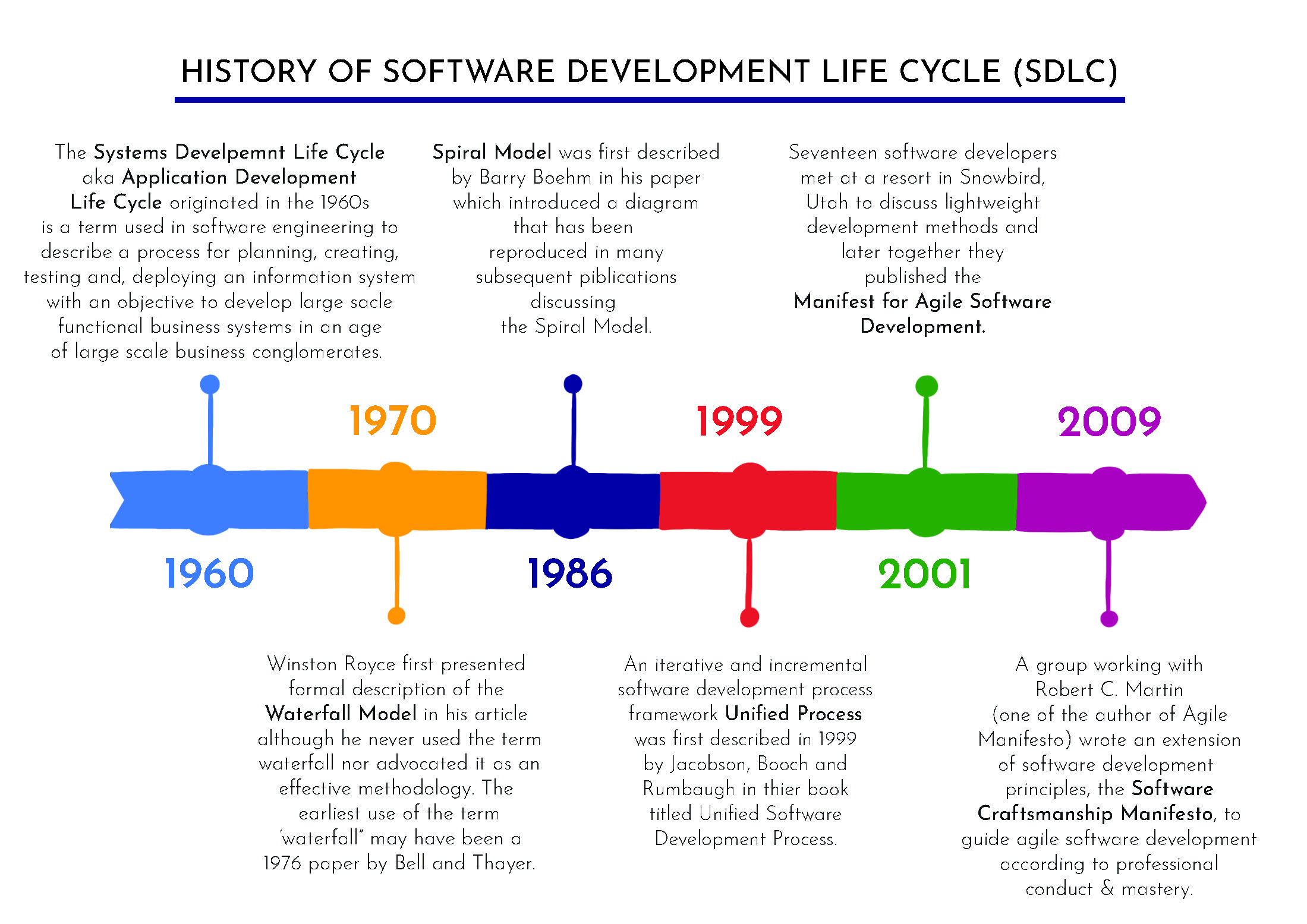
History of Software Testing (Very Important Concept)
4.1 Early Days (1970s–1980s)
-
Developers tested their own code
-
No separate testing role
-
Focus only on finding errors
4.2 Growth Phase (1990s)
-
Software became complex
-
Dedicated testers introduced
-
Manual testing dominated
4.3 Modern Era (2000s–Present)
-
Agile & DevOps introduced
-
Automation testing
-
Continuous Testing
-
AI-assisted testing
4.4 Today
-
Testing is not optional
-
Quality is a business requirement
What Is a Bug / Defect / Error / Failure?
5.1 Definitions
-
Error – Human mistake (developer writes wrong logic)
-
Defect/Bug – Problem in code
-
Failure – Software behaves incorrectly
5.2 Simple Example
-
Calculator shows
2 + 2 = 5-
Error → Wrong formula written
-
Bug → Incorrect code
-
Failure → Wrong output shown to user
-
Objectives of Software Testing
-
Find defects before customers do
-
Ensure software meets requirements
-
Improve product quality
-
Reduce maintenance cost
-
Increase customer confidence
-
Ensure security & performance
Myths About Software Testing (Important for Beginners)
❌ Testing is easy
❌ Anyone can do testing
❌ Testing means only clicking
❌ Testing has no growth✅ Reality:
-
Testing needs logic + domain knowledge
-
Testing has career growth
-
Testing is critical to product success
Importance of Software Testing in Today’s World
8.1 Why Testing Is Critical Today?
-
Online payments
-
Banking systems
-
Healthcare software
-
E-commerce platforms
-
Government portals
8.2 Impact of a Single Bug
-
Financial loss
-
Legal issues
-
Brand reputation damage
-
Loss of user trust
Who Performs Software Testing?
9.1 Roles Involved
-
Manual Tester
-
Automation Tester
-
Performance Tester
-
Security Tester
-
QA Analyst
-
Test Lead / QA Manager
9.2 Tester vs Developer (Basic Difference)
Tester Developer Finds bugs Writes code Thinks like end user Thinks logically Prevents failures Builds features
Where Does Software Testing Fit in SDLC?
10.1 SDLC Overview
-
Requirement
-
Design
-
Development
-
Testing
-
Deployment
-
Maintenance
👉 Testing is involved at every stage, not only after coding.
-
Types of Software Testing (Introduction Only)
(Just overview, detailed later modules)
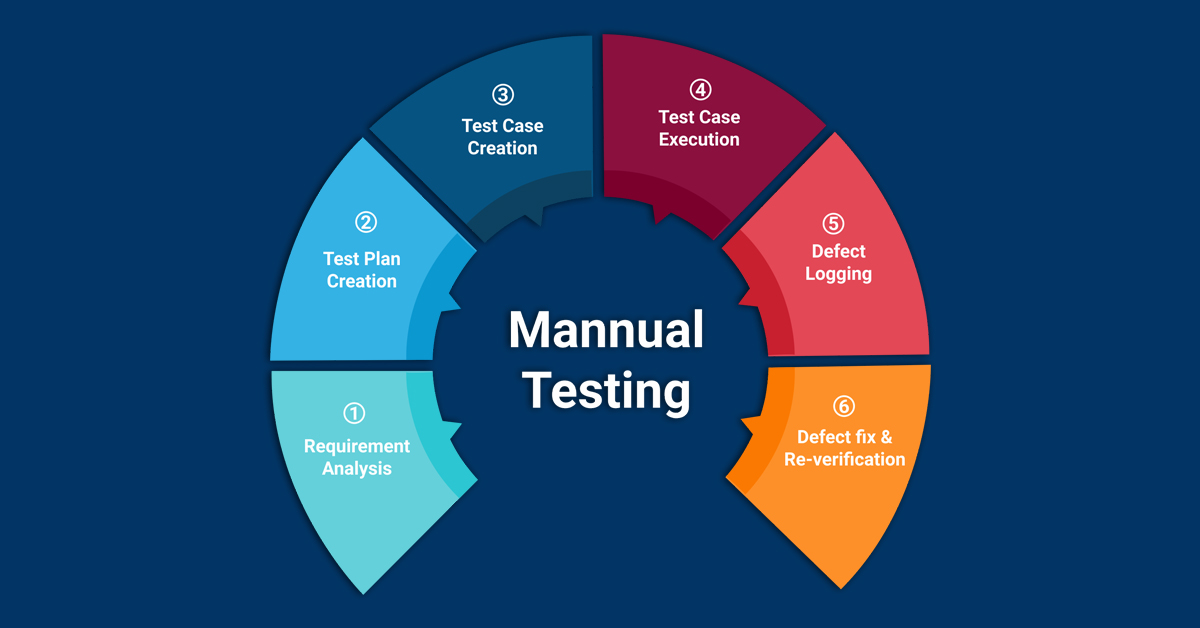
Manual Testing
Automation Testing
Functional Testing
Non-Functional Testing
Regression Testing
Smoke & Sanity Testing
Skills Required to Become a Software Tester
12.1 Technical Skills
SDLC & STLC
Test case writing
Bug reporting
Basic SQL
Basic programming (later)
12.2 Non-Technical Skills
Logical thinking
Observation
Communication
Documentation
Patience
Career Path After Learning Software Testing
13.1 Entry Level
Manual Tester / QA Trainee
13.2 Growth Options
Automation Tester
Performance Tester
Security Tester
Test Lead
QA Manager
SDET
13.3 Future Opportunities
DevOps Testing
AI Testing
Cloud Testing